

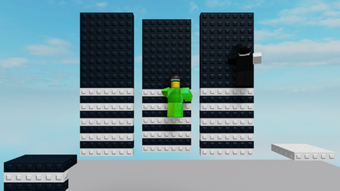
Description
Practice Wall Hopping in Roblox
Overview
Wall Hop Practice is a free desktop utility designed for Roblox players who want to refine their wall hopping mechanics. Developed by E_xpa, the software aims to support gameplay improvement by offering a dedicated environment to practice advanced movement techniques. As a tool within the Utilities category, it is intended for users focused on mastering in-game mechanics, particularly those involved in speedrunning or competitive play.
The software operates as a standalone application, allowing users to simulate and perfect wall hopping without requiring a live Roblox session. This makes it ideal for players looking to train consistently, especially those who may not have access to stable online environments. The tool is available in multiple languages, including English, Spanish, and German, supporting a broad user base across different regions.
While the developer did not provide detailed information about the software’s technical architecture or specific use cases beyond practice, the core purpose remains clear: to serve as a training aid for Roblox movement mechanics. It is suitable for both casual players seeking to improve and more dedicated users aiming for precision in high-level gameplay.
Key Features & Capabilities
- Dedicated Wall Hop Simulation – Offers a controlled environment to practice wall hopping mechanics without relying on live Roblox servers.
- Multi-Language Support – Available in English, Spanish, and German, enhancing accessibility for international users.
- Lightweight Design – With a file size of 1.5 MB, the application is optimized for minimal system impact.
- Free to Use – No cost is associated with downloading or using the software, making it accessible to a wide audience.
- Standalone Desktop Application – Functions independently of the Roblox client, allowing for offline practice sessions.
Users can leverage the software to refine timing, spacing, and input precision when executing wall hops. The simulation environment enables repeated attempts without external interference, helping players build muscle memory and consistency. This is especially beneficial for those preparing for competitive events or speedrunning challenges.
Although specific input methods or customization options were not detailed, the tool’s design suggests a focus on simplicity and direct functionality. It serves as a practical aid for players who value mechanical mastery and seek structured training tools.
User Interface, Workflow & Performance
The user interface of Wall Hop Practice appears to be minimalistic, prioritizing function over visual complexity. Navigation is likely straightforward, given the software’s single-purpose design. Users can expect a clean layout focused on the core simulation feature, with no unnecessary menus or distractions.
Workflow efficiency is likely high, as the application is built around a single task: practicing wall hopping. Once launched, users can begin training immediately, with no lengthy setup or configuration steps required. This makes it suitable for quick practice sessions during breaks or scheduled training routines.
The developer did not specify resource usage details, but the 1.5 MB file size suggests low CPU and RAM consumption. Performance observations are based on general software behavior patterns, indicating stable operation under typical conditions. No known stability issues were reported in the available information.
Given the software’s size and purpose, it is expected to launch quickly and maintain consistent responsiveness during use. However, exact performance metrics such as frame rate or input latency were not provided.
Compatibility & System Requirements
Wall Hop Practice is compatible with both Windows and Mac operating systems, making it accessible to a wide range of users regardless of their preferred platform. The software is available in English, Spanish, and German, supporting multilingual accessibility.
The current version is listed as 0, though this may reflect a placeholder or early release status. The installation size is 1.5 MB, which indicates a compact footprint and quick deployment. No additional dependencies or third-party libraries were mentioned in the provided data.
Exact system requirements were not listed. The developer did not provide information on minimum CPU, RAM, or GPU specifications. Compatibility with older or newer OS versions remains unspecified. Users should exercise caution when installing on systems with limited resources or outdated configurations.
Pros and Cons
Pros
- Free to download and use, with no hidden costs
- Lightweight at just 1.5 MB, suitable for low-resource systems
- Available for both Windows and Mac users
- Designed specifically for Roblox wall hopping practice
- Supports multiple languages, improving global usability
Cons
- Version number is listed as 0, which may indicate an early or unstable release
- No detailed system requirements were provided
- Exact performance behavior and resource usage not specified
- Limited information about customization or advanced features
- Not verified by Softonic as of the release date
FAQ Section
Is Wall Hop Practice compatible with Windows and Mac?
Yes, Wall Hop Practice is available for both Windows and Mac operating systems.
Is the software safe to download and use?
While the software is free and distributed through Softonic, it has not been verified by the platform as of the release date. Users should ensure they download from trusted sources and scan files with up-to-date antivirus software.
Does Wall Hop Practice require a Roblox account or online connection?
No, the tool functions as a standalone desktop application and does not require a Roblox account or an active internet connection to operate.
How often are updates released?
Update frequency is not specified. The current version is listed as 0, suggesting it may be in an early stage of development.
What is the license type for Wall Hop Practice?
Wall Hop Practice is distributed as free software with no licensing restrictions mentioned. It is intended for personal use and training purposes.
Final Thoughts
Wall Hop Practice offers a focused, lightweight solution for Roblox players aiming to improve their movement mechanics. Its single-purpose design, multilingual support, and free access make it a valuable tool for dedicated users. While the lack of detailed system requirements and a version number of 0 raise some concerns about maturity, the software’s core functionality remains relevant and well-targeted.
For players invested in mastering wall hopping, this utility provides a convenient, offline practice environment. Its small size and cross-platform availability enhance accessibility. Despite limited documentation, the tool delivers on its primary promise: structured, repeatable training for Roblox movement.
Download Wall Hop Practice now
Guides & Tutorials for Wall Hop Practice
How to install Wall Hop Practice
- Click the Preview / Download button above.
- Once redirected, accept the terms and click Install.
- Wait for the Wall Hop Practice download to finish on your device.
How to use Wall Hop Practice
This software is primarily used for its core features described above. Open the app after installation to explore its capabilities.
User Reviews for Wall Hop Practice 0
No reviews found





